![RazorSync_Icon.png]](https://help.razorsync.com/hs-fs/hubfs/RazorSync_Icon.png?height=40&name=RazorSync_Icon.png)
The Guide: How To Set Up and Use Time-Based Service Items in RazorSync
Ready to streamline time tracking and make billing a breeze? Here’s how:
- Enable Auto-Calculated Service Items
- Go to your Settings > Workflow and toggle on the Service Items - Time Based (Auto-Calculated).
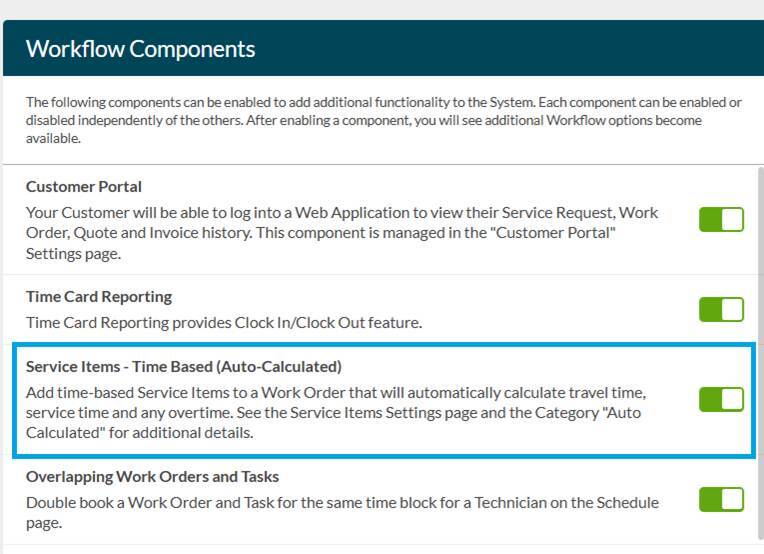 These include:
- Travel Time: Records the minutes from when your tech marks a job as “en route” to “on site.”
- Service Time: Captures every minute from “on site” until the job is completed.
- Overtime: Tracks minutes worked after a scheduled job end time.
- Find Your Service Items
- Head over to Settings > Service Items.
- Use the search bar to look up “auto calculated” or related terms (like “service time,” “on-site,” or “travel”).
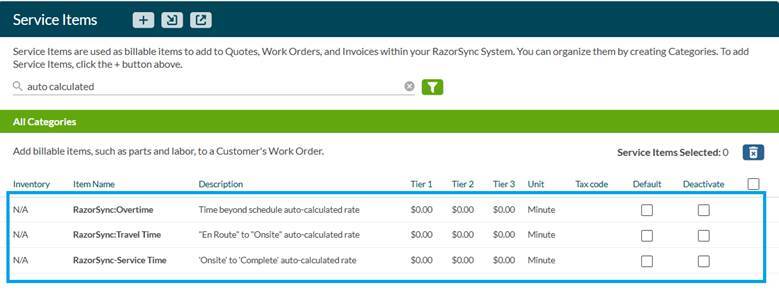
- Assign Categories for Easy Organization
- The default category will be called, “Auto-Calculated”.
- Want to keep things tidy? Create a category (e.g., “Time Based Items”) or use an existing one like “Labor.”
- Click on a service item, open its details, and assign it to your chosen category.
- Set Pricing—or Use as a Reference
- Decide if you’re billing for these minutes or just tracking them for internal reference.
- Add a price per minute (or set it to $0 if you only want to monitor team efficiency).
- Watch RazorSync Work Its Magic
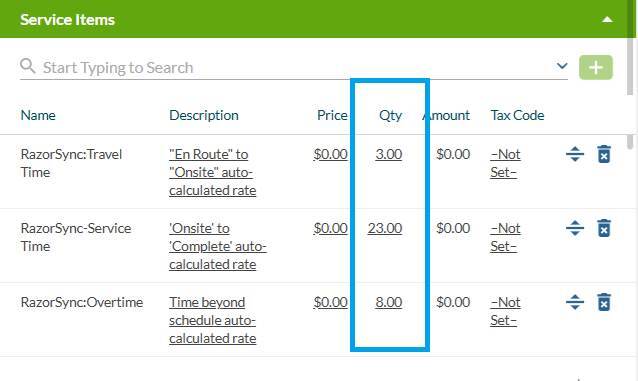
- When your techs update job statuses in the field (en route, on site, completed), RazorSync auto-calculates service item quantities in real time—no manual input required.
- All times display in minutes, so you’ll see exactly how long each phase takes. Example:
- Keep Your Team in the Loop
- For best results, train your technicians to update job statuses promptly. This ensures the time logs are accurate and reliable.