![RazorSync_Icon.png]](https://help.razorsync.com/hs-fs/hubfs/RazorSync_Icon.png?height=40&name=RazorSync_Icon.png)
How to Replace Your Card on File
Only RazorSync admins have access to update payment details. Here’s how you can quickly update your card:
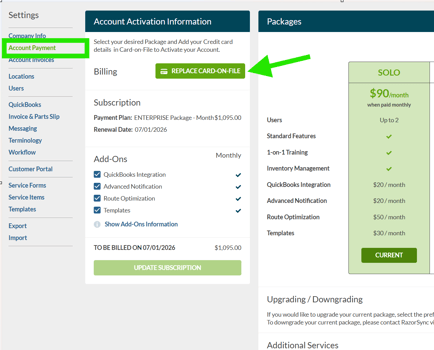
- Head to Settings:
Look for the little gear icon—it’s down in the bottom left corner. That’s your shortcut to all account controls. - Select Account Payment:
Up top in the menu bar, click on "Account Payment." This is where your billing info lives. - Replace Card on File:
Spot the green "Replace Card on File" button at the top left? Go ahead and click it—no need to hunt for hidden options! - Enter Your New Card Details:
Fill in your updated card info. Double-check those numbers so there’s no interruption to your RazorSync access. - Click Submit:
Hit "Submit" to lock in your changes. That’s it! You’re all set.