![RazorSync_Icon.png]](https://help.razorsync.com/hs-fs/hubfs/RazorSync_Icon.png?height=40&name=RazorSync_Icon.png)
Here’s how to pinpoint the source—and silence unnecessary reminders with a few simple clicks:
- Check RazorSync Notifications First:
- Head to Settings in RazorSync.
- Click on Messaging, then switch over to the Customer tab.
- Scroll down to Work Order is Invoiced.
- Make sure this setting is OFF. If it’s already off, RazorSync isn’t sending the messages.
- Turn Off Invoice Reminders in QuickBooks Online:
QuickBooks recently updated their system to automatically email customers when new invoices are added—even those you export from RazorSync.- Click the Settings gear icon in the top right of QBO.
- Select Account and settings.
- Go to the Sales tab.
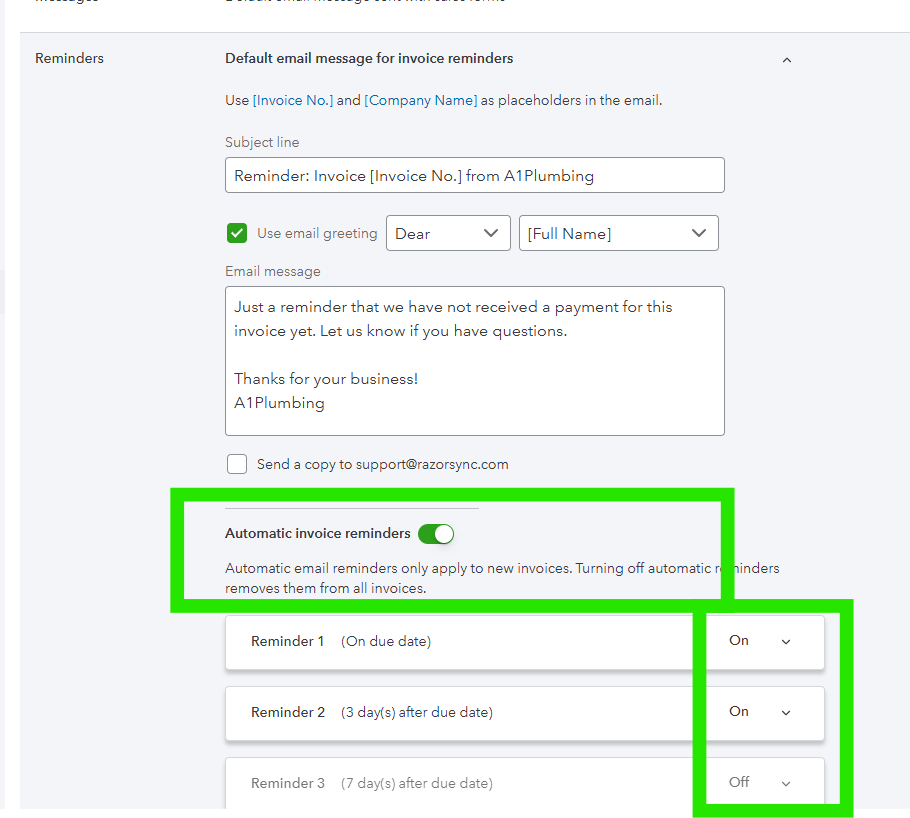
- In the Reminders section, click Edit (✎).
- Switch Automatic invoice reminders to OFF.
- There may be multiple reminders that you need to turn off.
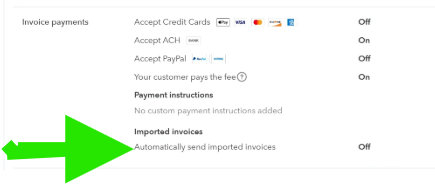
- Imported Invoice Reminder (New Feature from QBO)
- Invoice Payment Reminder
- Save your changes.