![RazorSync_Icon.png]](https://help.razorsync.com/hs-fs/hubfs/RazorSync_Icon.png?height=40&name=RazorSync_Icon.png)
Steps to Set Up Job Costing:
Set Profit Margin
- Navigate to Settings > Workflow in your RazorSync account.
- Scroll down to the Job Costing section on the left side menu.
- Enter your desired default profit margin percentage (e.g., 20%, 30%) in the designated field.
- Click Save at the bottom left of the screen.

Set Base Cost for Items
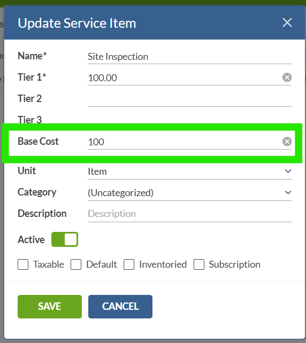
- Go to your Service Items section.
- Select and edit a service item you want to use for job costing.
- In the item details, locate the new Base Cost field and enter the actual cost value for that item.
- Click Save to update the service item.
How to Use Job Costing on Work Orders, Quotes, or Invoices:
- Open or create a work order, quote, or invoice.
- Add your service item(s) to the document.
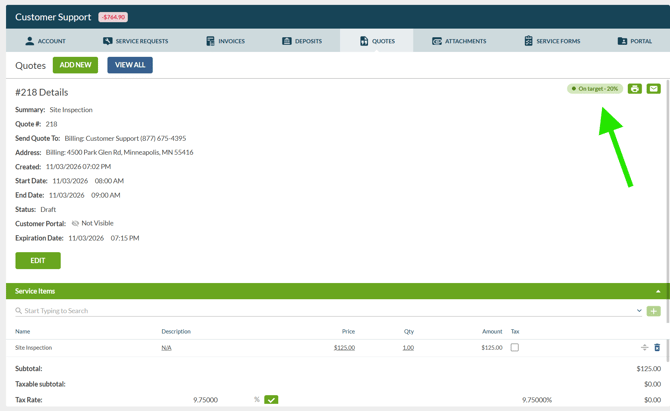
- Look for the pill-shaped indicator in the top right corner of the screen—it will display one of three statuses:

- Loss (red) - You're operating at a loss or below your goal
- Below Target(yellow/green) - At base cost or below profit goal
- Above Goal (green) - You're exceeding your profit margin goal
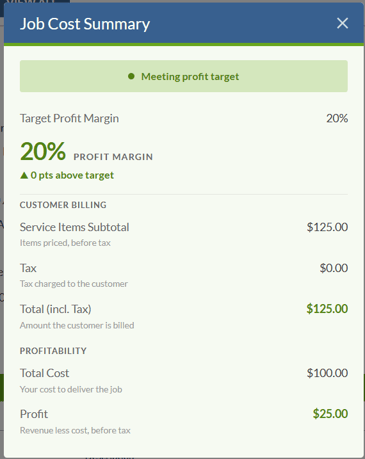
- Click on the pill-shaped icon to view a detailed breakdown showing:
- Service item subtotal
- Total cost
- Profit margin percentage
⚠️ Important Setup Requirements:
Job Costing will not work unless you complete BOTH setup steps. You must set a default profit margin in Workflow settings AND enter a base cost for each service item. Without the base cost value, the system has no way to calculate your profitability. Make sure to update all service items you plan to track with their accurate base cost before using this feature on customer-facing quotes or work orders.
***Job Costing Profit Margin is only visible to the Admin Role Type. User roles will not be able to access Job Costing or view profit margin on work orders, invoices, and quotes.
Pro Tip: Use Job Costing on quotes before sending them to customers to verify your pricing meets profitability goals and avoid accidentally quoting jobs at a loss.