![RazorSync_Icon.png]](https://help.razorsync.com/hs-fs/hubfs/RazorSync_Icon.png?height=40&name=RazorSync_Icon.png)
Here’s how to tweak RazorSync so it uses the language your team knows and loves:
How To Guide
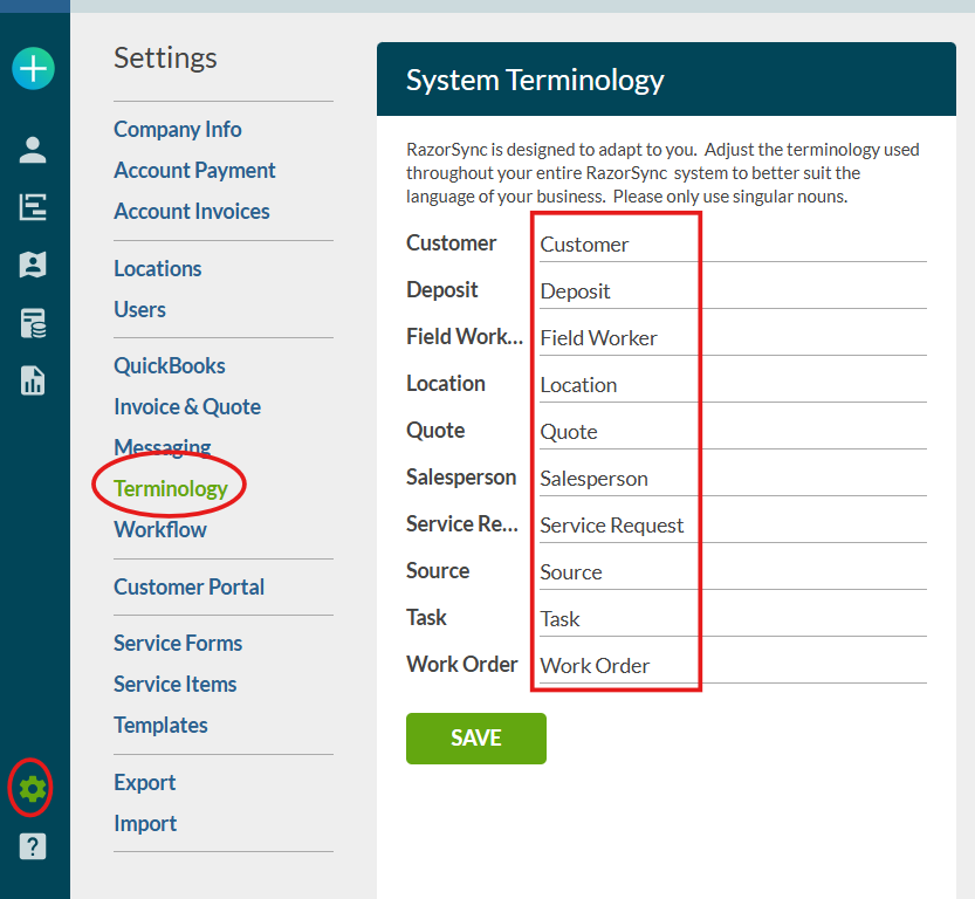
- Head to Settings:
Log in and look for the gear icon or find the ‘Settings’ section in your RazorSync dashboard. - Find ‘Terminology’:
Click on ‘Terminology’ within the Settings menu. This is your hub for customizing the way RazorSync talks. - Choose the Field You Want to Change:
See terms like “Quotes,” “Jobs,” or “Technicians”? Click on any term you want to update. - Type in Your Preferred Verbiage:
For example, swap “Quote” for “Estimate,” or “Technician” for “Service Pro”—whatever fits your company culture. - Click ‘Save’:
Don’t forget to hit Save! Instantly, RazorSync will start using your new terms throughout the platform.
Pro-Tip / Bonus Benefit:
Changing terminology doesn’t just make your software friendlier—it can help reduce mistakes and misunderstandings, especially for new hires. And when your clients see “Estimate” instead of “Quote” on paperwork, it reinforces your professionalism and their trust.
Wrap-up:
Customizing RazorSync is a quick win for your business: it saves time, avoids confusion, and makes every interaction—from dispatch to invoice—a little more “you.” Dive into Terminology Settings today and make RazorSync work in your language!